
A product visualisation pilot starts with one product, a clear output and a review process. This showcase connects published production evidence with a practical brief for discussing your own project.
The campaign work is credited to Mimic Productions. The proposed pilot is a separate Mimic XR enquiry opportunity; its scope and deliverables must be agreed for your product.
Discuss a one-product pilot with Mimic XR. Include your product, available assets and intended channel in the enquiry.
On this page
Verified production evidence: Balmain 1945
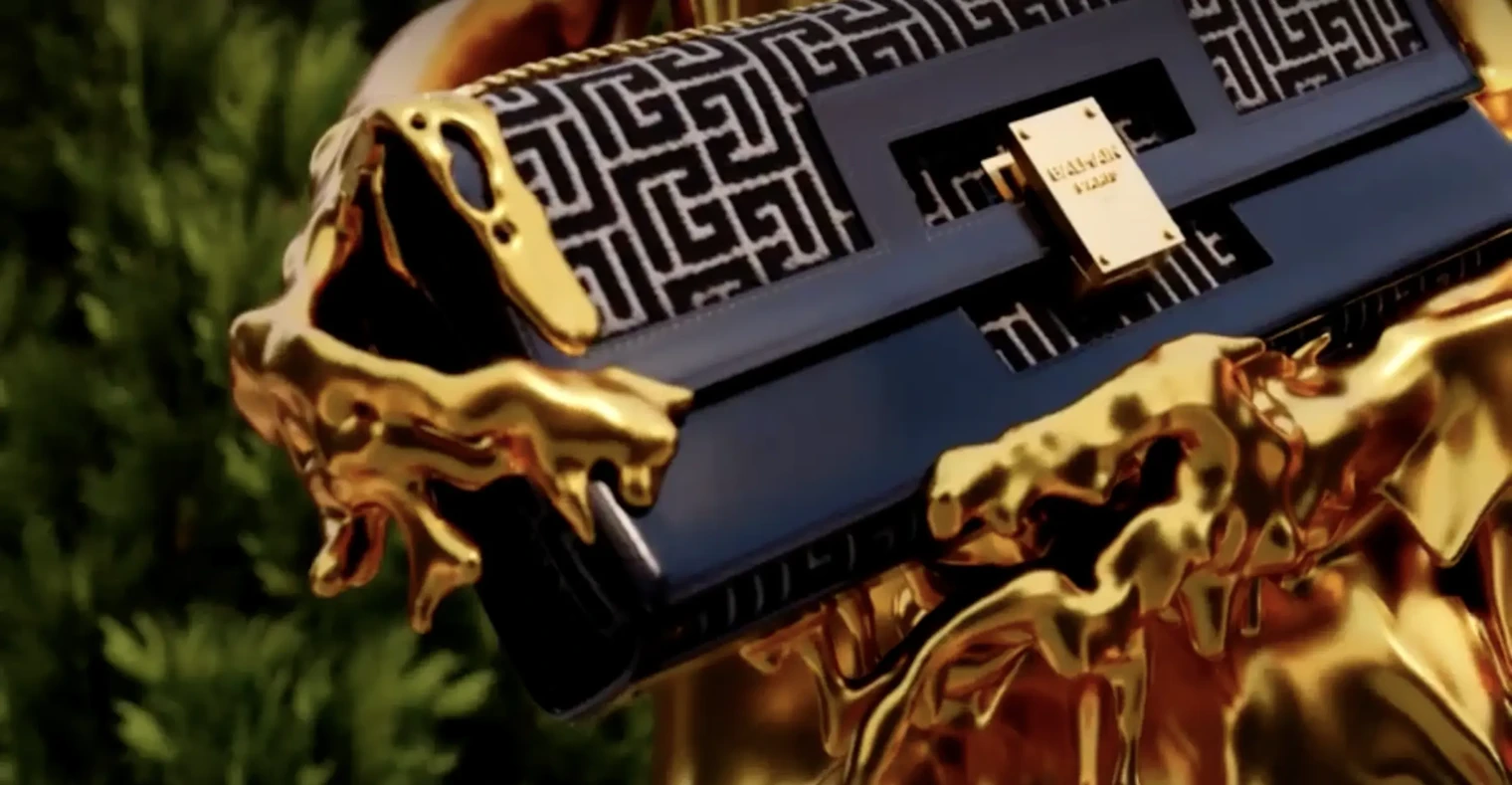
The Mimic Productions project record credits its team with modelling, texturing, look development and rigging for Sucuk & Bratwurst’s Balmain 1945 campaign, released in 2020. The deliverable was a digital product asset for advertising.
The published breakdown describes attention to the bag’s form, chain and hardware, material appearance, and controls for folds and movement. It provides evidence of product-asset production. It does not document a Shopify deployment, a customer-operated configurator or measured ecommerce conversion results.
Credits: brand — Balmain; client and creative partner — Sucuk & Bratwurst; digital product asset contribution — Mimic Productions. Campaign imagery shown here is credited to Sucuk & Bratwurst. See the Balmain project overview on Mimic XR for the existing portfolio presentation.
Plan a pilot around one product and one decision
The pilot framework below is a proposed starting scope for a new project, not a description of the Balmain engagement or a fixed package. Choose one representative product and the buyer question it should answer: understanding its shape, examining a material, seeing a feature move, or judging its scale.
Choose one primary output first. A still-image pilot can establish product appearance through agreed views. A short animation can explain a movement or assembly. An interactive viewer can let customers inspect the model; AR adds a placement route that needs separate device and scale checks. These outputs require different work and should not be treated as interchangeable.
State the audience, channel and next action in the brief. A campaign asset, a product-page model and a sales demonstration may share production inputs, but their approval criteria differ. Discuss 3D product visualisation when choosing the output, and AR product visualisation if placement in a customer’s environment is essential.
A useful first boundary is one product revision, an agreed number of finishes, one primary delivery route and a named approver. Additional variants, interactive controls or platform integrations should be listed explicitly. Pricing and scheduling follow source assessment and an agreed scope; this page does not promise a fixed fee or turnaround.
What to send for an assessment
Product: identify the representative item, its current revision and the feature customers need to understand. Include dimensions and photographs of the full object and important details. Mark any uncertain or incomplete references so they can be resolved before production.
Source assets: list available CAD, existing models, textures, graphics and physical samples. State the originating software and file formats where known. If the data is confidential, first agree a suitable transfer route with the team. The CAD-to-3D product models guide explains what to assess before assuming an export will be sufficient.
Outputs: specify still views, animation requirements or the intended viewer, along with target devices and the proposed launch channel. For a store project, include the store URL and who owns implementation. The Shopify 3D models guide separates asset production from storefront responsibilities.
Approvals: identify who signs off dimensions, materials, brand presentation and the final customer journey. Share the target date and budget range if available. Use the project brief template to collect these decisions before sending an enquiry.
Agree deliverables and acceptance before production
Source assessment: establish which assets can be reused, what must be reconstructed, the important missing references and the proposed production route. The outcome should be a scope that both parties can understand, with assumptions and exclusions recorded.
Geometry review: compare the product’s silhouette, dimensions, components and required details against the approved reference. Resolve mismatches at this stage rather than relying on lighting or camera angles to conceal them.
Material review: approve the chosen finishes, texture direction, graphics and surface response under agreed viewing conditions. Decide how feedback will be consolidated and distinguish corrections from new creative or product changes.
Output review: approve the actual delivered images, film or interactive asset. For interactive work, agree devices, browsers, loading expectations, controls and fallback content. Test product scale if AR is included. A studio render alone cannot verify a browser experience.
Handover: list delivered files, editable source assets if included, licences, version identifiers, implementation ownership and known limitations. Define how later product changes will be requested. For output-specific planning, compare the rendering guide with the animation guide.
Decide whether the pilot is ready to expand
Begin with production acceptance: does the asset represent the approved product, meet the agreed output requirements and have a workable update process? Record the decisions and remaining issues. A successful sample should establish a repeatable production method before a full catalogue is commissioned.
Then evaluate the customer journey where it is deployed. Can users find the relevant product detail and continue to the intended purchase, enquiry or sales conversation? Define what constitutes a qualified enquiry and keep internal tests separate from customer activity.
Compare results with a documented baseline where the sample supports a meaningful comparison. Model views and time spent are useful signals, but do not establish sales impact by themselves. Campaign changes, stock, pricing and low traffic can all affect interpretation.
Expand when the production process is reliable and the experience supports a clear buyer task. If the first output does not answer the customer’s question, revise that requirement before adding more assets.
Frequently asked questions
Is this a working interactive demo?
This page presents credited campaign imagery and production evidence, plus a proposed pilot scope. It does not contain a customer-operated 3D model or claim that the Balmain campaign was an ecommerce configurator.
Who produced the Balmain product asset?
Mimic Productions’ published portfolio credits its modelling, texturing, look-development and rigging contribution for Sucuk & Bratwurst’s Balmain 1945 campaign. The creative partner and campaign imagery are credited on this page.
Can a pilot include Shopify or AR?
Those can be discussed as delivery routes. Asset production, storefront implementation, supported devices and acceptance testing must be scoped explicitly; they are not automatically included in every product-visualisation project.
How do we request a pilot scope?
Send the representative product, available source formats, desired output, target channel, approval owner and launch requirements. Agree the transfer method before sharing confidential files. Pricing and schedule are established after assessment.
Request your pilot scope
Start the conversation with one product and one intended output. Tell us which part of the buying decision is difficult to communicate today and what customers should be able to do after seeing the asset.
Request a product visualisation pilot discussion — include “Product visualisation pilot” in your message, along with your product, source formats, delivery channel and target date.
Editorial note: prepared with AI assistance. Published portfolio evidence and credits checked on 26 November 2026. Proposed pilot stages are planning recommendations, not claims about an undocumented client workflow.